Skip to content
Fokuno

Starting is the hard part. Fokuno plans the rest.

Fokuno puts your tasks into Google Calendar as blocks, around school, practice and appointments. When a block begins, Fokuno pulls you in with a short ritual and keeps distractions away until it ends.

Mainly for what? Optional.

Free while Fokuno is in beta. We only use your address for the invitation. Privacy

Fokuno's week view: appointments from Google Calendar with indigo focus blocks for tasks and habits in between.
A week in the Windows app, with sample data. Fokuno placed the indigo blocks itself.

You know what to do. Nothing says when.

A to-do list tells you what's due. When you'll do it stays open. So the task slides to the evening, then to tomorrow, and the day before the deadline gets tight.

Fokuno gives every task a fixed place in your week. When that moment comes, the decision has already been made, and all that's left is to start.

This is well researched: people who decide in advance when and where they'll do something follow through far more often.

Gollwitzer & Sheeran (2006): meta-analysis of 94 studies with more than 8,000 participants, effect size d = 0.65.

A week with Fokuno

From the task to the end of the day. The images are from the Windows app, which is in German for now.

  1. Sunday, 6 pm

    You write down what's due. Fokuno spreads it out.

    One line per task is enough, duration and deadline included: “Biology summary 45 min by Thursday”. Fokuno looks for free time in your calendar and puts blocks there, most urgent first.

    Studying for an exam? Fokuno splits it into 25 to 45 minute sessions spread over the days up to the day before. If you move a block by hand, it stays where you put it.

    Fokuno's input field with the line “Bio Zusammenfassung 45 min bis Donnerstag” (biology summary, 45 min, by Thursday).
  2. Monday, 4:30 pm

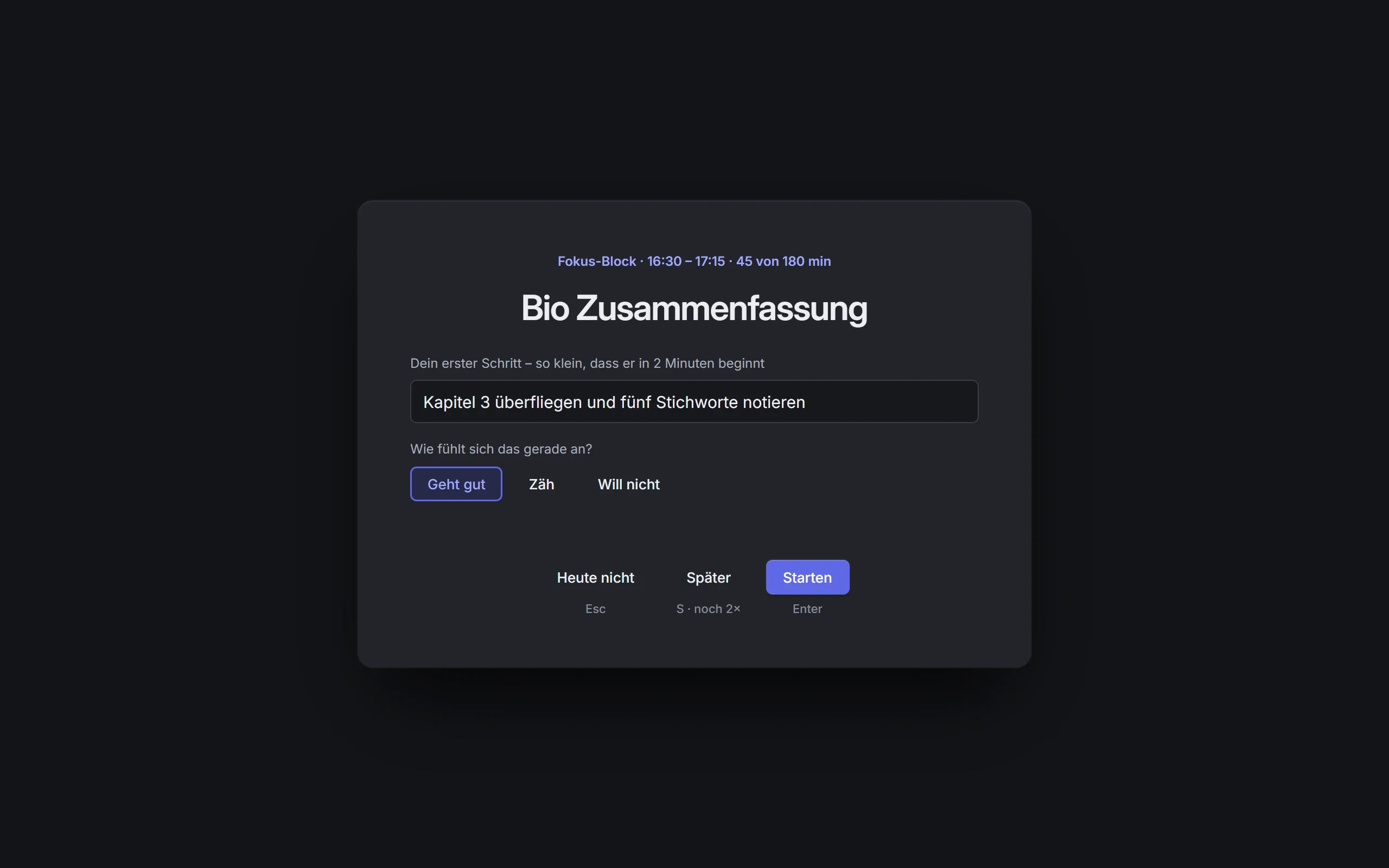
    The block starts with a question: what's your first step?

    Before the timer runs, you write down how you'll begin. Small enough to start within two minutes. If your note from last time is still there, you pick up right where you left off.

    If the time doesn't work, Fokuno suggests the next free slots. And if you just don't feel like it, it briefly asks why. Honest is enough. During the block, music without vocals plays, or your Spotify playlist.

    The ritual before a focus block: a field for the first step and the question how it feels right now.
  3. Monday, 4:52 pm

    YouTube can wait.

    Open a distracting site or app during a block and Fokuno steps in briefly: take one breath. Then you choose whether to go back to work, take five minutes on purpose, or mark the site as part of your work.

    Prefer it strict? Switch to blocking, and the site stays closed until the block ends. You can turn on the same break from distractions without a block, say for a whole evening.

    A short pause like this works: in a six-week field study with 280 people, participants abandoned 36% of their attempts to open a distracting app (Grüning, Riedel & Lorenz-Spreen, PNAS 2023).

    Fokuno's breathing pause: “Einmal durchatmen.” (take one breath) with buttons to go back to work, take 5 minutes anyway, or mark it as work.
  4. Tuesday, 7 am

    Habits get their moment in the day.

    Read three times a week, vocabulary every morning: Fokuno spreads habits across the week and puts them at the same time of day whenever it can. Same moment, same action, and a habit sticks more easily.

    Miss one and it lapses. The next days stay as they were.

  5. Thursday, 9:30 pm

    Wrapping up the day.

    Two minutes at the end of the day: what went well, what slowed you down, how you'll start tomorrow.

    Then the day is done. Tomorrow, your first step is already waiting.

    The end-of-day review in Fokuno: how the day went, what slowed you down, and the first step for tomorrow.

Three steps to your first block

You need a Google Calendar and about ten minutes.

  1. Sign upYour email address at the top of the page, then a quick confirmation. New people join in small groups.
  2. Open the invitationThe email has the button “Activate access”, the Windows download and the link to the web app.
  3. Write down a taskSign in with Google, connect your calendar, write one line: “Biology summary 45 min by Thursday”. Fokuno finds the time.

A planner with fixed rules

Fokuno plans by rules you can read. The same tasks and appointments produce the same plan, and whatever you change by hand stands.

Your hours
Blocks only go into the hours you allow, for example after school from 4:30 to 9:30 pm.
Three hours a day at most
Fokuno won't schedule more focused work than that unless you change it. Every appointment gets 15 minutes of breathing room.
Most urgent first
Whatever needs the most time relative to its deadline gets a slot first.
The good hours
Fokuno picks the earliest day with a good hour, and the best hour on that day. After 20 focus blocks it knows when you actually get started.
You have the last word
Blocks you move stay put. A deleted block means “not today”, and the work moves to another day.
Calm weeks
A block that sits well isn't touched. If one shifts by 30 minutes or more, Fokuno tells you.

How Fokuno plans, step by step

Plan with Claude, ChatGPT or Cursor.

Fokuno comes with an MCP server. You connect it to Claude, ChatGPT, Cursor or any other tool that speaks MCP using a personal address that Fokuno gives you. The assistant can then read and change your tasks, habits and appointments when you ask. The planner rearranges everything afterwards.

The server speaks MCP over Streamable HTTP and needs no separate sign-in: the address is your key, and you can revoke it in Fokuno at any time. Without an assistant, Fokuno works just the same.

Examples of requests to an assistant

  • What's still due this week, and is there enough time before Friday?
  • I have a biology exam on the 12th. Plan three hours of studying for me.
  • Start a break from distractions today from 8 pm.
  • From next week, read 30 minutes three times a week, preferably in the morning.

What happens to your data

Fokuno needs your calendar to plan. The essentials, in short:

  • Stored in Zurich. Tasks, plans and settings live on your device and, so that all your devices show the same thing, on servers in Zurich.
  • Only its own blocks. Fokuno reads your calendar to find free time and adds its own blocks. It only changes your other appointments when you do so in Fokuno yourself.
  • No selling, no ads. Your data is never sold, never used for advertising and never used to train AI models.
  • No cookies, no trackers. This website counts visits itself, without cookies or third-party services. Your IP address is not stored for this.
  • Deletion on request. An email to hallo@fokuno.com is enough, and everything tied to your account is deleted.

The full privacy policy

Questions

What is Fokuno?

Fokuno is an app for Windows and the browser that schedules your tasks and habits as focus blocks in your Google Calendar on its own. When a block begins, it helps you get started with a short ritual and keeps distractions away until the block ends. In the evening you close the day with a short review.

Who is Fokuno for?

For anyone with plenty to do who finds it hard to get started. Fokuno is built first for school and university students: the defaults fit an afternoon after class, and studying for exams is spread over several days. If you work during the day, change the hours.

Which calendar do I need?

A Google Calendar. Fokuno reads your appointments there and adds its blocks, so you also see them in Google Calendar on your phone. Outlook or Apple calendars work if you add them to Google Calendar. You can import appointments from .ics files directly.

Which devices does Fokuno run on?

As an app on Windows 10 and 11, and as a web app in the browser. On your phone, open the web app and add it to your home screen. Apps for Mac and iPhone are planned but not available yet. The app itself is in German for now.

What does Fokuno cost?

Nothing during the beta. If Fokuno costs something later, you'll hear about it by email first and decide for yourself.

How is Fokuno different from Motion or Reclaim?

Those apps also put tasks into your calendar automatically. Fokuno also takes care of the moment after: the ritual to get started, the breathing pause against distractions and the end-of-day review, all in one app. And whatever you move or delete by hand, the planner leaves alone.

What happens if I move or delete a block?

A block you move stays where you put it, and Fokuno plans around it. A deleted block means: not on this day. Fokuno finds the time on another day. If you check off a block, its time counts as done.

Does Fokuno read my appointments?

Yes, otherwise it wouldn't know when you're free. It sees the title, time and location of your appointments. So that phone and web show the same day, a copy of your appointments from yesterday to three weeks ahead is kept on our server in Zurich. None of it is sold or used for advertising.

Do I need Claude or ChatGPT?

No. An AI assistant is an extra for people who'd rather plan their week in a conversation. Fokuno works just the same without one. If you like, connect Claude, ChatGPT, Cursor or another MCP-capable tool with your personal address.

When do I get access?

New people join in small groups, so setup can be checked for everyone. The invitation comes by email, with the Windows download and the link to the web app.

Try it on your next week.

Sign up. When it's your turn, the invitation with the download arrives.

Mainly for what? Optional.

Free while Fokuno is in beta. We only use your address for the invitation. Privacy